Build an AI Application with Rails UI
Create modern interfaces for AI and LLM-powered applications. Chat interfaces, prompt builders, and response displays designed for AI workflows.
The challenge
AI applications require unique interfaces: streaming chat responses, conversation history, prompt input areas, and output formatting. These patterns are different from traditional CRUD apps and require careful design consideration.
The Rails UI solution
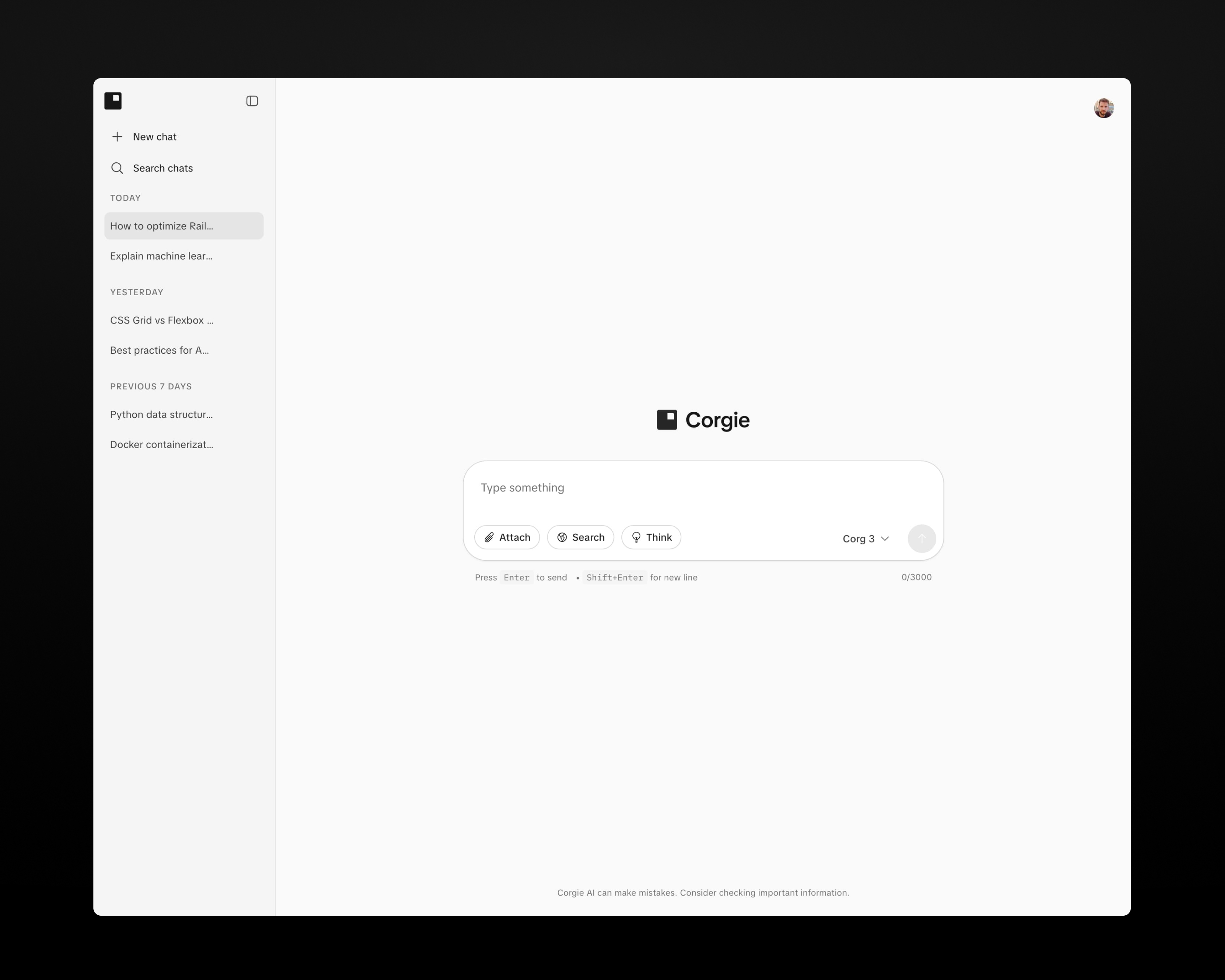
The Corgie app kit is built with AI applications in mind. It features chat-style layouts, code block formatting, and clean interfaces that put the AI-generated content front and center.
Key components for AI apps
Chat interfaces
Message bubbles and conversation layouts optimized for AI interactions.
Code blocks
Syntax-highlighted code display with copy functionality for AI-generated code.
Input areas
Expandable text inputs for prompts with submit handling.
Loading states
Skeleton loaders and progress indicators for async AI responses.
Sidebar navigation
Conversation history and settings organized in a collapsible sidebar.
Cards
Display AI model options, templates, or prompt suggestions in clean cards.
Recommended app kit: Corgie
Corgie's modern, minimal design creates the perfect backdrop for AI-generated content. The focus is on readability and clean presentation.